GraphQL Pagination and Sorting
Editor's Note
This article was originally written by Chris Potter and me when we worked at Reaction Commerce. It was published on April 15, 2020 on the Reaction Commerce Blog. Reaction Commerce was acquired by Mailchimp and the blog has disappeared, so I'm republishing here to keep the content available. I will need to reference it myself if I ever have to do graphql pagination again. To my knowledge, this is the most in-depth and technically detailed resource on the topic.
Another note is that OFFSET/LIMIT pagination MAY have severe performance problems due to full table scans to count the number of rows. So if your table has 100K rows or more you'll need to benchmark and may need an alternate implementation based on cursors.
When building client/server applications, data sets that are too large to reasonably transmit and process in a single request must be made manageable via pagination. All databases and APIs typically provide a mechanism for this. This tutorial will walk you through implementing GraphQL pagination with PostgreSQL, but first let's explain and review the concepts needed for SQL and pagination.
Conceptual Overview and Glossary
The following are common terms when describing GraphQL and SQL pagination. Some terms are taken from GraphQL pagination specifications and supported with GraphQL connections information from Facebook. For SQL terminology we'll use the Postgres definitions but they are relatively generic between SQL implementations.
Offset + limit pagination terms
This is a pagination method that starts from the first record of a sorted dataset and "pages" forward a number of offsets depending on the limit of records requested. If there are 20 records in the result, offset 1 with limit 5 will start from limit × offset + 1 or from the 6th record, since offsets are 0 based. The downside of offset pagination stems from the fact it always starts from the first record in a data set, meaning to get the last page in a result, the database query needs to create and scan past all pages before it. This becomes less efficient as your data size increases.
limit - a number that specifies the maximum records to be returned in a query. If there are not enough records to fill the limit, all records are returned.
offset - informs SQL how many rows to skip before returning the next set of records.
Cursor pagination terms
This pagination is based upon opaque identifiers which map to records within your data set. Cursors act as a bookmark to identify positions from which to start or end pagination. Cursors solve some efficiency problems because they will load only the data requested, starting or ending with the given opaque identifier.
cursor - a unique identifier for a record, generally an opaque value.
Note: A cursor is not a specific column in your database, but should be considered a function that serves to locate a particular position in a data set. In the most simple case your function might be cursor = field, but this should not be an universal expectation across cursor implementations
after - GraphQL argument indicating the unique identifier we want to start our page from and get all results after not including this identifier.
first - coupled with after, this is the number of records to return after the supplied cursor. If no cursor is supplied, then this will be the number of records to return from the start of the collection. Can also be used in GraphQL with an offset to implement traditional offset pagination where first represents limit.
before - Complement of after. Indicates the unique identifer we want to "end" our page with and get all results before, not including, the cursor.
last - coupled with before, this is the number of records to return before the supplied cursor. If no cursor is supplied, then this will be the number of records to return from the end of the collection.
PSA regarding cursor pagination
Specifications for cursor pagination assume a stable sort and direction on a unique field from the collection. Cursor pagination assumes that all data will be in the same direction and listed/sorted by the same value every time. This might be practical for timeline based live streams (a la Twitter or Facebook) where you can always sort by most recent timestamp, but at Reaction Commerce we deal with customizable product lists within categories, search parameters that need higher levels of merchandising and sorting (e.g. list products from lowest to highest price or alphebetically by name). Therefore we have introduced two new terms which let us specify list orders discretely but add higher orders of complexity:
sortBy: the pivot field from the database to sort the paginated results by.(e.g "name" "breed" "fur-color")
sortOrder: the order in which to send the returned results. Options
are ASC or DESC.
Aside: our cursor pagination will always fallback to a stable sort on a
unique field from the collection. This ensures that requested sortBy
fields that match (everyone named "Jane Doe") will return the same way
with subsequent requests.
Cursor pagination information (pageInfo)
For GraphQL pagination there is a data structure that is commonly returned relating to the position of the returned results, defined from Facebook's cursor connections specificaion (see further reading). This structure is as follows
"pageInfo": {
    "startCursor": "<opaque-cursor>",
    "endCursor": "<opaque-cursor>",
    "hasPreviousPage": boolean,
    "hasNextPage": boolean
}
startCursor and endCursor simply map to the first and last items
in the collection of results returned from the query. No matter if the
results match the limit requested, we always return a startCursor and
endCursor.
Pages are tricky
Depending on the sort order of a collection, before and after will
infer whether a returned collection hasPreviousPage or hasNextPage
Pictures for 1000 words
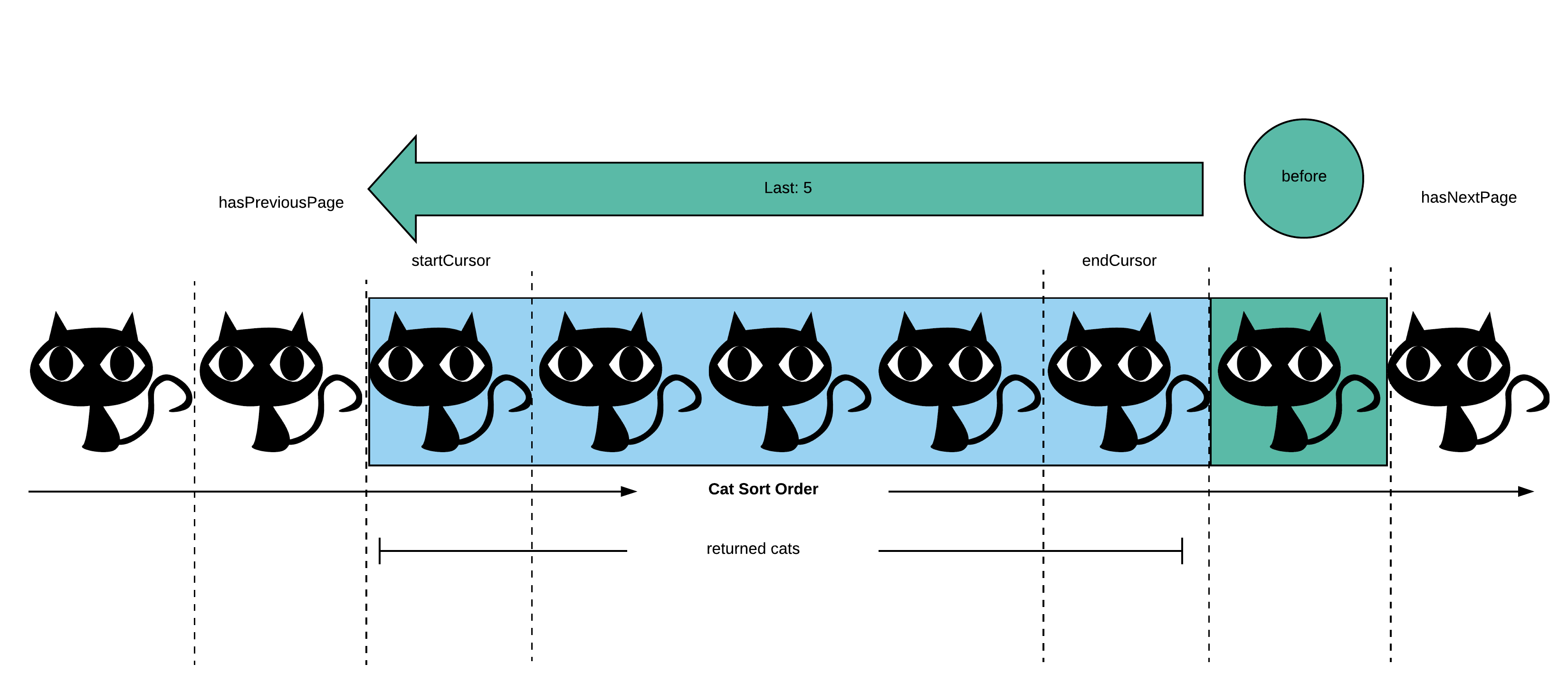
Here is our cursor pagination represented by a pictoral cat collection
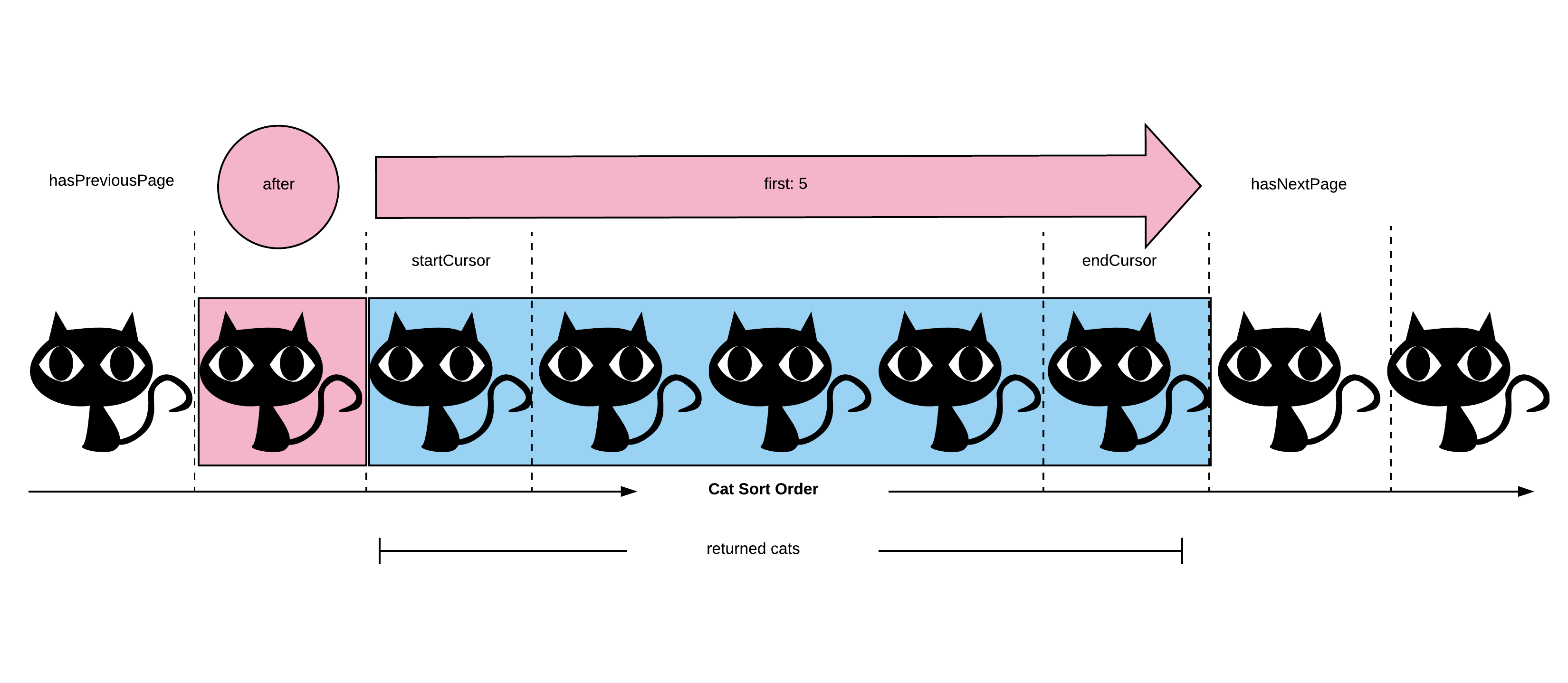
In the context of the first image we would query for the second cat, and
limit our selection to the next 5 cats after it. hasNextPage should
return true since the second to last cat exists (the next cat after
the returned collection). hasPreviousPage will also return true since
there is a record before the after cursor (pink circle)
In the context of the second image we would query for the second to last
cat, and limit our selection to the previous 5 cats before it.
hasNextPage should return true since the last cat exists, since we
exclude the queried record (green circle) from our paging information
(we already know it exists). hasPreviousPage will also return true
since the second cat exists (the cat before the returned collection).
Important note from the Facebook connection specifications which is demonstrated in the above images: the ordering of edges should be the same when using first/after as when using last/before, all other arguments being equal. It should not be reversed when using last/before
Lets get to it already
In this tutorial, we'll walk through implementing GraphQL-style pagination on top of a PostgreSQL relational database step by step. In this case the process of understanding the requirements, implementing them, and verifying they are working properly is a nice encapsulated example of the software development process and what kinds of work we as software engineers typically do.
A Simple Data Set
To give ourselves the best shot at implementing this quickly, and correctly, we'll create a simple synthetic data set that is small enough to quickly scan and also designed to surface sorting issues in an easy-to-spot way.
Here's some SQL to create our set of test records:
CREATE TABLE cats (id int PRIMARY KEY, name text NOT NULL);

INSERT INTO cats (id, name) VALUES
  (1, 'esther'), (2, 'cookie'), (3, 'cookie'),
  (4, 'cookie'), (5, 'dave'), (6, 'bosco'),
  (7, 'frida'), (9, 'giggles'), (10, 'jasmine'),
  (11, 'jerry'), (12, 'alice'), (13, 'iggy');
We can see our data with a simple query
SELECT * FROM "cats";
 id |  name
----+---------
  1 | esther
  2 | cookie
  3 | cookie
  4 | cookie
  5 | dave
  6 | bosco
  7 | frida
  9 | giggles
 10 | jasmine
 11 | jerry
 12 | alice
 13 | iggy
(12 rows)
PostgreSQL is returning those results in the order they were inserted
(at least so it seems), but to ensure consistent results, we should
explicitly order by a unique column in our collection, in our case we'll
use id.
SELECT * FROM "cats" ORDER BY "id" ASC;
 id |  name
----+---------
  1 | esther
  2 | cookie
  3 | cookie
  4 | cookie
  5 | dave
  6 | bosco
  7 | frida
  9 | giggles
 10 | jasmine
 11 | jerry
 12 | alice
 13 | iggy
(12 rows)
Also note we have some cats with the same name. This will help us ensure correct results for some trickier cases later on.
Case 1.1: just first
GraphQL pagination uses the inputs first or last to specify a
reduced page size. Here's the most basic paginated query just asking for
the first 3 results plus the pagination metadata fields.
GraphQL query
query {
  cats(first: 3) {
    edges {
      cursor
      node {
        id
        name
      }
    }
    totalCount
    pageInfo {
      startCursor
      endCursor
      hasPreviousPage
      hasNextPage
    }
  }
}
SQL Construction
Let's work through the fields in the graphql response and see how we can obtain the data we need via SQL.
- The GraphQL argument
firstis a pagination limit which is going to map directly to the SQLLIMITclause for this query hasPreviousPageisfalsewhenever we havefirstbut notafterin our graphql arguments so we can determine this directly in code and don't need any related SQL. This is by definition the first page.hasNextPageis going to be computed with our first technique which we'll call beyond the limit. We'll add 1 to the providedfirstparameter to "peek" ahead in the results and see if we're at the true end or not. Then we can determinehasNextPagewithrows returned > first. So for this query ourLIMITwill be4instead of3. When the SQL results are returned the last record, if it exists, is omitted from the GraphQL response.- When results are passed, If the number of results matches the
limit requested (4), we will know that the
hasNextPageistruesince a record exists for the start of the next page. This technique will be used for the extent of querying whether a page has another page before or after, depending on the GraphQL request.
- When results are passed, If the number of results matches the
limit requested (4), we will know that the
startCursoris the cursor from the first row in the resultsendCursoris the cursor from the last row in the results (after omitting thehasNextPage"peek" record if it's there)totalCountrequires an additional query. For convenience, we'll use the SQLASalias to present the total_count as a column in our main result set. It will end up in every row, but they will all be identical so we'll just use the value in the first returned row.
SELECT *,
  (SELECT COUNT(*) FROM "cats") AS "total_count"
  FROM "cats"
  ORDER BY "id" ASC
  LIMIT 4;
Aside: since this tutorial is focused on pagination, we'll always do
SELECT * in our SQL. In a production application if a table had many
columns, you would probably specifically select only the columns
required by the graphql query.
SQL Results
id |  name  | total_count
----+--------+-------------
  1 | esther |          12
  2 | cookie |          12
  3 | cookie |          12
  4 | cookie |          12
(4 rows)
GraphQL Response
{
  "data": {
    "cats": {
      "edges": [
        {
          "cursor": "1",
          "node": {
            "id": 1,
            "name": "esther"
          }
        },
        {
          "cursor": "2",
          "node": {
            "id": 2,
            "name": "cookie"
          }
        },
        {
          "cursor": "3",
          "node": {
            "id": 3,
            "name": "cookie"
          }
        }
      ],
      "pageInfo": {
        "endCursor": "3",
        "hasNextPage": true,
        "hasPreviousPage": false,
        "startCursor": "1"
      },
      "totalCount": 12
    }
  }
}
So we got 4 rows back from the database, but omitted cookie 4 from the
graphql results and got our has*Page booleans correct.
Case 1.2: just last
To implement last isn't so easy though because SQL doesn't directly
support this. LIMIT always implies a limit from the beginning of the
results in SQL.
We need to take a different approach. We have a few options
- Make a separate query to count the number of rows and use that to
calculate an
OFFSET - Have the database reverse the sort direction of the results and use
LIMIT, but then reverse the results in the application before sending the GraphQL response.
GraphQL
query {
  cats(last: 3) {
    edges {
      cursor
      node {
        id
        name
      }
    }
    totalCount
    pageInfo {
      startCursor
      endCursor
      hasPreviousPage
      hasNextPage
    }
  }
}
SQL Option 1: Separate count query
-- First do a query to get the total row count
SELECT count(*) FROM "cats";
 count
-------
    12
-- Compute the offset as total count minus limit
-- Then use that to send the right OFFSET
SELECT * FROM "cats" ORDER BY "id" ASC LIMIT 3 OFFSET (12 - 3);
 id | name
----+-------
 11 | jerry
 12 | alice
 13 | iggy
SQL Option 2: Double Reverse
The SQL LIMIT clause only works at the beginning of the result set,
not the end. But if we reverse the direction, the beginning is then the
end, right? So we can hack our way to the right results with
- Use the reverse direction in our SQL
ORDER BYclause - Use the
LIMITclause - Reverse the in-memory results in the application while building the graphql results
Here's how our graphql pagination metadata will be computed
hasPreviousPagewill use our beyond the limit technique again, but here the results will be reversedhasNextPageRequestinglastwithoutbeforeis by definition requesting the last page of results, so we knowhasNextPagemust befalseherestartCursoris theidfrom the next-to-last row in the SQL results- This accounts both for the limit + 1 "peeking" and the double-reversing
endCursoris theidfrom the first row in the resultstotalCountwill use the same subselect/alias technique again
SELECT *,
  (SELECT COUNT(*) FROM "cats") AS "total_count"
  FROM "cats"
  ORDER BY "id" DESC
  LIMIT 4;
 id |  name   | total_count
----+---------+-------------
 13 | iggy    |          12
 12 | alice   |          12
 11 | jerry   |          12
 10 | jasmine |          12
(4 rows)
That gives us the correct 3 rows (13, 12, 11), plus our
hasPreviousPage row count peek row(10), but the rows are in the
incorrect order, so in our application code, we'd need to:
- Check the row count to determine
hasPreviousPage - discard the extra row if present
- reverse the remaining rows for proper ordering
; In clojure, if the sequence of database result rows is bound to "results"
; we'd do:
(reverse results)
// In javascript, if the database results was in the "results" array,
// we'd do
results.reverse()
GraphQL Response
{
  "data": {
    "cats": {
      "edges": [
        {
          "cursor": "11",
          "node": {
            "id": 11,
            "name": "jerry"
          }
        },
        {
          "cursor": "12",
          "node": {
            "id": 12,
            "name": "alice"
          }
        },
        {
          "cursor": "13",
          "node": {
            "id": 13,
            "name": "iggy"
          }
        }
      ],
      "pageInfo": {
        "endCursor": "13",
        "hasNextPage": false,
        "hasPreviousPage": true,
        "startCursor": "11"
      },
      "totalCount": 12
    }
  }
}
Case 1.3: first + after: paging forward
OK back in the forward pagination direction via first, to get
subsequent pages of the query, a graphql client will send the after
parameter. The value of this is an opaque GraphQL cursor which was
provided in the pageInfo.endCursor field of the response for the
previous page. For clarity in this tutorial, we will return the raw ids
of the first and last records returned. In production code, we follow
Facebook's suggestion of lightly reinforcing the "opaque" nature of
cursors by base64 encoding them.
GraphQL query
query {
  cats(first: 3, after: "3") {
    edges {
      cursor
      node {
        id
        name
      }
    }
    totalCount
    pageInfo {
      startCursor
      endCursor
      hasPreviousPage
      hasNextPage
    }
  }
}
To make this work in SQL, we need to build a WHERE clause to skip the
first bit of the result set by reference, as opposed to trying to use
OFFSET.
Let's work through the fields in the graphql response and see how we can obtain the data we need via SQL.
- Most things for page 2 will work the same as for page 1:
firsthasNextPagestartCursorendCursortotalCount
afteris new and to make this work in SQL, we need to build aWHEREclause to skip the first part of the result set by reference, as opposed to trying to useOFFSET.hasPreviousPagewe'll now have to compute. We willCOUNT(*)the results using an inverseWHEREclause and alias that ashas_previous_page. By "inverse WHERE clause" we mean use a comparison operator opposite from the one used to skip prior pages. So in this case since our mainWHEREclause uses greater than (>), we'll use less than or equal to (<) in ourhas_previous_pagesubselectWHEREclause.(SELECT COUNT(*) FROM "cats" WHERE "id" < 3) AS "has_previous_page"- This query returns
3and our application logic converts it to a boolean with just> 0logic. - This conversion to boolean could also be done directly in SQL but we declared that out of scope for this post
SELECT *,
  (SELECT COUNT(*) FROM "cats" WHERE "id" < 3) AS "has_previous_page",
  (SELECT COUNT(*) FROM "cats") AS "total_count"
  FROM "cats"
  WHERE "id" > 3
  ORDER BY "id" ASC
  LIMIT 4;
SQL results
id |  name  | has_previous_page | total_count
----+--------+-------------------+-------------
  4 | cookie |                 2 |          12
  5 | dave   |                 2 |          12
  6 | bosco  |                 2 |          12
  7 | frida  |                 2 |          12
(4 rows)
GraphQL response
{
  "data": {
    "cats": {
      "edges": [
        {
          "cursor": "4",
          "node": {
            "id": 4,
            "name": "cookie"
          }
        },
        {
          "cursor": "5",
          "node": {
            "id": 5,
            "name": "dave"
          }
        },
        {
          "cursor": "6",
          "node": {
            "id": 6,
            "name": "bosco"
          }
        }
      ],
      "pageInfo": {
        "endCursor": "6",
        "hasNextPage": true,
        "hasPreviousPage": true,
        "startCursor": "4"
      },
      "totalCount": 12
    }
  }
}
Case 1.4: last + before: paging backward
Lets remember our collection in ascending id order:
SELECT * FROM "cats" ORDER BY "id" ASC;

 id |  name
----+---------
  1 | esther
  2 | cookie
  3 | cookie
  4 | cookie
  5 | dave
  6 | bosco
  7 | frida
  9 | giggles
 10 | jasmine
 11 | jerry
 12 | alice
 13 | iggy
(12 rows)
For paging backward from the end, clients send last and before using
the value from startCursor in the previous query.
query {
  cats(last: 3, before: "13") {
    edges {
      cursor
      node {
        id
        name
      }
    }
    totalCount
    pageInfo {
      startCursor
      endCursor
      hasPreviousPage
      hasNextPage
    }
  }
}
To implement this, we flip our WHERE operator to be less than (<),
flip our direction to be DESC and then again reverse in the
application code.
SELECT *,
  (SELECT count(*) FROM "cats" WHERE "id" > 13) as has_next_page,
  (SELECT COUNT(*) FROM "cats") AS "total_count"
  FROM "cats"
  WHERE "id" < 13
  ORDER BY "id" DESC
  LIMIT 4;
Notes on the SQL statement and how our graphql pagination metadata will be computed
hasPreviousPagewill use our beyond the limit technique again, but here the results will be reversedhasNextPagehere we will use the same techinque asafterandfirstwith a similar query(SELECT count(*) FROM "cats" WHERE "id" > 13) as has_next_page,startCursoris theidfrom the next-to-last row in the SQL results- This accounts both for the limit + 1 "peeking" and the double-reversing
endCursoris theidfrom the first row in the resultstotalCountwill use the same subselect/alias technique again
SQL Result
 id |  name   | has_next_page | total_count
----+---------+---------------+-------------
 12 | alice   |             0 |          12
 11 | jerry   |             0 |          12
 10 | jasmine |             0 |          12
  9 | giggles |             0 |          12
(4 rows)
GraphQL response
{
  "data": {
    "cats": {
      "edges": [
        {
          "cursor": "10",
          "node": {
            "id": 10,
            "name": "jasmine"
          }
        },
        {
          "cursor": "11",
          "node": {
            "id": 11,
            "name": "jerry"
          }
        },
        {
          "cursor": "12",
          "node": {
            "id": 12,
            "name": "alice"
          }
        }
      ],
      "pageInfo": {
        "endCursor": "12",
        "hasNextPage": false,
        "hasPreviousPage": true,
        "startCursor": "10"
      },
      "totalCount": 12
    }
  }
}
Part 2: Handling client-specified order
Case 2.1: first + sortBy
When your GraphQL clients need to specify the order of results, we have extra complexity to manage.
query {
  cats(first: 3, sortBy: "name", sortOrder: ascending) {
    edges {
      cursor
      node {
        id
        name
      }
    }
    totalCount
    pageInfo {
      startCursor
      endCursor
      hasPreviousPage
      hasNextPage
    }
  }
}
Here we need to map the GraphQL parameters to our ORDER BY clause
which is straightforward.
SELECT * FROM "cats" ORDER BY "name" ASC LIMIT 3;
----+--------
 12 | alice
  6 | bosco
  3 | cookie
We can see our results are in the correct order. However, we do have 3 cats named cookie. We happened to get cookie 3 in this result, but that's not guaranteed to always be the case. To ensure consistent results, we should add a secondary sort.
SELECT * FROM "cats" ORDER BY "name" ASC, "id" ASC LIMIT 3;
 id |  name
----+--------
 12 | alice
  6 | bosco
  2 | cookie
Here we'll always get cookie 2 in this page (assuming an unchanged data set).
Paging forward with ordering
Lets remember our collection in name order by both name and id for consistency.
SELECT * FROM "cats" ORDER BY "name" ASC, "id" ASC;
id |  name
----+---------
 12 | alice
  6 | bosco
  2 | cookie
  3 | cookie
  4 | cookie
  5 | dave
  1 | esther
  7 | frida
  9 | giggles
 13 | iggy
 10 | jasmine
 11 | jerry
(12 rows)
When it comes time to query the second page of these results, we need a
way to express "when sorted by name ascending, I need the results that
come after X" where X is the endCursor from the first page. One way to
do this is to make an extra query by the id from the cursor to get that
cat's name, and use that in our WHERE clause.
query {
  cats(first: 3, after: "2", sortBy: "name", sortOrder: ascending) {
    edges {
      cursor
      node {
        id
        name
      }
    }
    totalCount
    pageInfo {
      startCursor
      endCursor
      hasPreviousPage
      hasNextPage
    }
  }
}
SELECT "name" FROM "cats" WHERE "id" = 2;
-- Now we know that cat 2 is named cookie

SELECT * FROM "cats"
  WHERE "name" >= 'cookie'
  AND "id" != 2
  ORDER BY "name" ASC, "id" ASC LIMIT 3;
id |  name
----+--------
  3 | cookie
  4 | cookie
  5 | dave
We need to make sure cookie 2 doesn't appear in both page 1 and page 2
of results so we explicitly filter her out by id in our WHERE clause.
SQL is capable of combining these 2 queries, so we take advantage of that with a subselect.
SELECT * FROM "cats"
  WHERE "name" >= (SELECT name FROM "cats" WHERE "id" = 2)
  AND "id" != 2
  ORDER BY "name" ASC, "id" ASC LIMIT 3;
id |  name
----+--------
  3 | cookie
  4 | cookie
  5 | dave
(3 rows)
Here's how our graphql pagination metadata will be computed with our added complexity:
hasNextPagewill use our beyond the limit technique again, increasingLIMITfrom3to4hasPreviousPageis more complicated because it introducts complexity with ducplicates- we want to reverse the direction of the
WHEREclause to get all records to<=- we need to account for cats with the same name but a lower
id than
afterin the previous page which is why=is included
- we need to account for cats with the same name but a lower
id than
aftercursor should be excluded from results withAND "id" != 2"- we need to exclude all cats of the same name who's IDs are
greater than the
aftercursor with
- we want to reverse the direction of the
 AND "id" NOT IN (SELECT "id" FROM "cats"
     WHERE "name" = (SELECT "name" FROM "cats" WHERE "id" = 2)
     AND "id" > 2))
```

for a final query that looks like:

```sql
  (SELECT * FROM "cats"
    WHERE "name" <= (SELECT name FROM "cats" WHERE "id" = 2)
    AND "id" != 2
    AND "id" NOT IN
      (SELECT "id" FROM "cats"
        WHERE "name" =
          (SELECT "name" FROM "cats"
             WHERE "id" = 2)
        AND "id" > 2));
id | name
----+-------
 6 | bosco
12 | alice
(2 rows)
we will return COUNT(*) and set this as has_previous_page
startCursoris theidfrom the next-to-last row in the SQL results- This accounts both for the limit + 1 "peeking" and the double-reversing
endCursoris theidfrom the first row in the resultstotalCountwill use the same subselect/alias technique again
Final Query
SELECT *,
  (SELECT COUNT(*) FROM "cats"
    WHERE "name" <= (SELECT name FROM "cats" WHERE "id" = 2)
    AND "id" != 2
    AND "id" NOT IN
      (SELECT "id" FROM "cats"
        WHERE "name" = (SELECT "name" FROM "cats" WHERE "id" = 2)
        AND "id" > 2))
    AS has_previous_page,
  (SELECT COUNT(*) FROM "cats") AS "total_count"
FROM "cats"
WHERE "name" >= (SELECT name FROM "cats" WHERE "id" = 2)
AND "id" != 2
ORDER BY "name" ASC, "id" ASC LIMIT 4;
SQL Results
 id |  name  | has_previous_page | total_count
----+--------+-------------------+-------------
  3 | cookie |                 2 |          12
  4 | cookie |                 2 |          12
  5 | dave   |                 2 |          12
  1 | esther |                 2 |          12
(4 rows)
GraphQL Response
{
  "data": {
    "cats": {
      "edges": [
        {
          "cursor": "3",
          "node": {
            "id": 3,
            "name": "cookie"
          }
        },
        {
          "cursor": "4",
          "node": {
            "id": 4,
            "name": "cookie"
          }
        },
        {
          "cursor": "5",
          "node": {
            "id": 5,
            "name": "dave"
          }
        }
      ],
      "pageInfo": {
        "endCursor": "12",
        "hasNextPage": true,
        "hasPreviousPage": true,
        "startCursor": "10"
      },
      "totalCount": "12"
    }
  }
}
Case 2.2: Paging backward with ordering: last and before
Once again a reminder:
SELECT * FROM "cats" ORDER BY "name" ASC, "id" ASC;
id |  name
----+---------
 12 | alice
  6 | bosco
  2 | cookie
  3 | cookie
  4 | cookie
  5 | dave
  1 | esther
  7 | frida
  9 | giggles
 13 | iggy
 10 | jasmine
 11 | jerry
(12 rows)
To implement paging backward from the end, consider these graphql inputs:
query {
  cats(last: 3, before: "13", sortBy: "name", sortOrder: ascending) {
    edges {
      cursor
      node {
        id
        name
      }
    }
    totalCount
    pageInfo {
      startCursor
      endCursor
      hasPreviousPage
      hasNextPage
    }
  }
}
For this we need to query for the name corresponding to our reference id, flip the direction, and reverse in application code again.
SELECT * FROM "cats"
  WHERE "name" <= (SELECT "name" FROM "cats" WHERE "id" = 13)
  AND "id" != 13
  ORDER BY "name" DESC LIMIT 3;
 id |  name
----+---------
  9 | giggles
  7 | frida
  1 | esther
We reverse that result in application code and we have the correct results.
Here's how our graphql pagination metadata will be computed with our added complexity:
-
hasPreviousPagewill use our beyond the limit technique again, increasingLIMITfrom3to4 -
hasNextPagejust as complicated as Case 2.1 with query reversal. The example will not have duplicate names, but we account for them nonetheless with one exception- whereas in
afterandfirstwe needed to exclude all options less than the suppliedid,beforeandlastwe need to do the opposite so our has_next_page query becomes
- whereas in
SELECT * FROM "cats"
  WHERE "name" >= (SELECT name FROM "cats" WHERE "id" = 13)
  AND "id" != 13
  AND "id" NOT IN (SELECT "id" FROM "cats"
      WHERE "name" = (SELECT "name" FROM "cats" WHERE "id" = 13)
      AND "id" < 13)
startCursoris theidfrom the next-to-last row in the SQL results- This accounts both for the limit + 1 "peeking" and the double-reversing
endCursoris theidfrom the first row in the resultstotalCountwill use the same subselect/alias technique again
Final Query
SELECT *,
  (SELECT COUNT(*) FROM "cats"
    WHERE "name" >= (SELECT name FROM "cats" WHERE "id" = 13)
    AND "id" != 13
    AND "id" NOT IN (SELECT "id" FROM "cats"
      WHERE "name" = (SELECT "name" FROM "cats" WHERE "id" = 13)
      AND "id" < 13))
    AS has_next_page,
  (SELECT COUNT(*) FROM "cats") AS "total_count"
FROM "cats"
WHERE "name" <= (SELECT name FROM "cats" WHERE "id" = 13)
AND "id" != 13
ORDER BY "name" DESC, "id" DESC LIMIT 4;
SQL Result
 id |  name   | has_next_page | total_count
----+---------+---------------+-------------
  9 | giggles |             2 |          12
  7 | frida   |             2 |          12
  1 | esther  |             2 |          12
  5 | dave    |             2 |          12
(4 rows)
GraphQL Result
Reminder: results in edges are reversed from SQL Result
{
  "data": {
    "cats": {
      "edges": [
        {
          "cursor": "1",
          "node": {
            "id": 1,
            "name": "ester"
          }
        },
        {
          "cursor": "7",
          "node": {
            "id": 7,
            "name": "frida"
          }
        },
        {
          "cursor": "9",
          "node": {
            "id": 9,
            "name": "giggles"
          }
        }
      ],
      "pageInfo": {
        "endCursor": "9",
        "hasNextPage": true,
        "hasPreviousPage": true,
        "startCursor": "1"
      },
      "totalCount": "12"
    }
  }
}
Case 2.3 A final example to work through
Let's work through this final challenging example
query {
  cats(last: 7, before: "3", sortBy: "name", sortOrder: descending) {
    edges {
      cursor
      node {
        id
        name
      }
    }
    totalCount
    pageInfo {
      startCursor
      endCursor
      hasPreviousPage
      hasNextPage
    }
  }
}
As a reminder, let's look at our data set sorted by name descending.
SELECT * FROM "cats" ORDER BY "name" DESC, "id" ASC;
id |  name
----+---------
 11 | jerry
 10 | jasmine
 13 | iggy
  9 | giggles
  7 | frida
  1 | esther
  5 | dave
  2 | cookie
  3 | cookie
  4 | cookie
  6 | bosco
 12 | alice
Now let's understand the graphql pagination request
last: 7means the client wants only 7 resultslastplusbeforemeans those results should be prior to the cursor- "prior" is defined here by the client-specified ordering
before: "3"means cookie 3 is our reference record
sortBy: namemeans they want them alphabetical by namesortOrder: descendingmeans they want them Z to A
So the correct result set looks like this
10 | jasmine
13 | iggy
 9 | giggles
 7 | frida
 1 | esther
 5 | dave
 2 | cookie
When building our SQL we need:
- a
LIMIT 7clause from thelastparameter- We will bump to
8forhasNextPagepeeking
- We will bump to
- an
ORDER BY nameclause but we need to flip the direction fromDESCtoASCbecause oflast - our final ordering by id for consistent results
- This is tricky because both
ASCandDESCgive us incorrect results for this case
- This is tricky because both
- a
WHERE "name"clause based on cat 3, which requires a subselect to get cat 3's name - our
id !=clause to manage cats with duplicate names - we'll also need an
id NOT INsubselect to properly exclude the cats named 'cookie' that belong to the page after this - The following will be handled with techniques already discussed
totalCount(subselect and alias)hasNextPage(beyond the limit)hasPreviousPagewill use an inverse where clause subselect as before
SQL Query Option 1
SELECT *,
  (SELECT COUNT(*) FROM "cats") AS "total_count",
  (SELECT COUNT(*) FROM "cats" WHERE "name" <
    (SELECT "name" FROM "cats" WHERE "id" = 3)) AS "has_previous_page"
  FROM "cats" WHERE
  "name" >= (SELECT "name" FROM "cats" WHERE "id" = 3)
  AND "id" != 3
  AND "id" NOT IN (SELECT "id" FROM "cats"
       WHERE "name" = (SELECT "name" FROM "cats" WHERE "id" = 3)
       AND "id" > 3)
  ORDER BY "name" ASC, "id" ASC
  LIMIT 8;
SQL Results
id |  name   | total_count | has_previous_page
----+---------+-------------+-------------------
  2 | cookie  |          12 |                 2
  5 | dave    |          12 |                 2
  1 | esther  |          12 |                 2
  7 | frida   |          12 |                 2
  9 | giggles |          12 |                 2
 13 | iggy    |          12 |                 2
 10 | jasmine |          12 |                 2
 11 | jerry   |          12 |                 2
(8 rows)
We can see the above full query repeats the subquery to find cat 3's name twice. As an optional optimization, we could run this once and store the result in a temporary table. Perhaps the query planner is already smart enough to do that optimization automatically though, so it'd be best to let benchmarks guide this choice.
SQL Query Option 2
SELECT name AS pivot_name INTO pivot_cat FROM "cats" WHERE id = 3;
SELECT *,
  (SELECT COUNT(*) FROM "cats") AS "total_count",
  (SELECT COUNT(*) FROM "cats" WHERE "name" < pivot_name)
  AS "has_previous_page"
  FROM "cats", pivot_cat WHERE
  name >= pivot_name
  AND "id" != 3
  AND "id" NOT IN (SELECT "id" FROM "cats"
                   WHERE "name" = pivot_name
                   AND "id" > 3)
  ORDER BY name ASC, "id" ASC
  LIMIT 8;
We get the same results as with option 1.
id |  name   | pivot_name | total_count | has_previous_page
----+---------+------------+-------------+-------------------
  2 | cookie  | cookie     |          12 |                 2
  5 | dave    | cookie     |          12 |                 2
  1 | esther  | cookie     |          12 |                 2
  7 | frida   | cookie     |          12 |                 2
  9 | giggles | cookie     |          12 |                 2
 13 | iggy    | cookie     |          12 |                 2
 10 | jasmine | cookie     |          12 |                 2
 11 | jerry   | cookie     |          12 |                 2
(8 rows)
GraphQL response
{
  "data": {
    "cats": {
      "edges": [
        {
          "cursor": "10",
          "node": {
            "id": 10,
            "name": "jasmine"
          }
        },
        {
          "cursor": "13",
          "node": {
            "id": 13,
            "name": "iggy"
          }
        },
        {
          "cursor": "9",
          "node": {
            "id": 9,
            "name": "giggles"
          }
        },
        {
          "cursor": "7",
          "node": {
            "id": 7,
            "name": "frida"
          }
        },
        {
          "cursor": "1",
          "node": {
            "id": 1,
            "name": "esther"
          }
        },
        {
          "cursor": "5",
          "node": {
            "id": 5,
            "name": "dave"
          }
        },
        {
          "cursor": "2",
          "node": {
            "id": 2,
            "name": "cookie"
          }
        }
      ],
      "pageInfo": {
        "endCursor": "2",
        "hasNextPage": true,
        "hasPreviousPage": true,
        "startCursor": "10"
      },
      "totalCount": "12"
    }
  }
}
Real Talk Time in writing this article we found bugs in 2 separate implementations of graphql pagination in reaction projects. This stuff is tricky!
Metatopic: The Process of Software Development
This blog post walks step-by-step through a process of implementing specified behavior. It takes a methodical and use-case driven approach. There are other approaches as well including test-driven development, adversarial (pitting QA against development), more academically rigorous methodologies, etc, but this is a pragmatic approach. Test data was carefully selected to make correctness and incorrectness easier to spot at a glance. Key in the data set was including the particular edge cases that expose bugs in initial attempts at implementation.